Most Shopify stores have products available in multiple colors, but those options aren’t always visible when customers browse a collection.
A product might be available in Black, White, Olive and Navy, while the collection page only shows one product image. Customers have to open the product page just to discover the other colors.
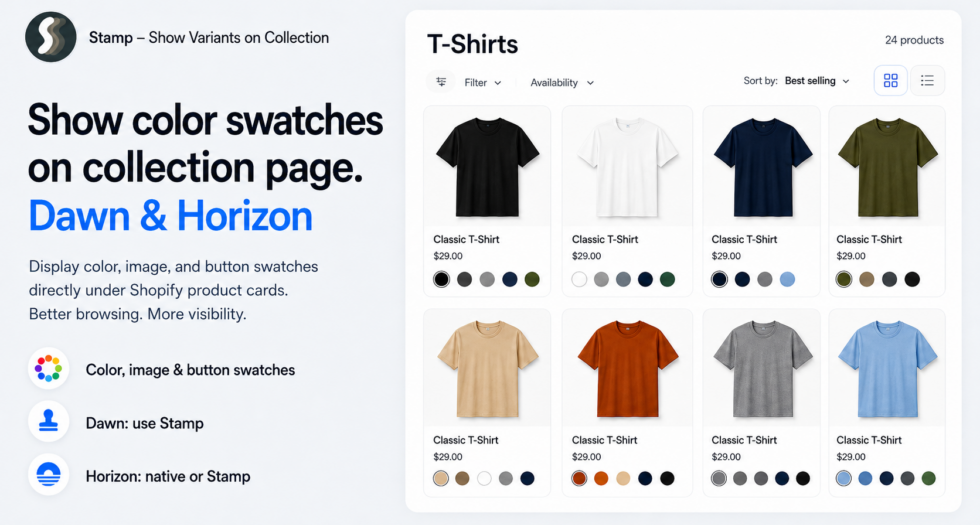
Adding color swatches to Shopify collection pages solves this by showing available variant colors directly underneath each product card.
How you can do this depends on your Shopify theme. Dawn and Horizon handle color swatches differently, and not every theme can display swatches natively on collection product cards.
In this guide, we’ll explain the difference and show how you can add color, image or button swatches to collection pages using Stamp — Show Variants on Collection.
What are color swatches on a Shopify collection page?
Color swatches are small visual selectors shown below a product card.
Instead of displaying only one product image, shoppers can immediately see that the product is also available in other colors.
For example, a jacket could appear as one product card with:
- Black
- Olive
- Sand
- Navy
shown as four small color swatches underneath it.
This gives customers more information without requiring them to open every product individually.
Color swatches vs showing variants as separate products
There are two common ways to make Shopify variants more visible on collection pages.
Color swatches keep one product card and display variant options underneath it.
Variants as products display selected variants as individual cards inside the collection grid.
For example:
- With swatches: one “Classic T-Shirt” card with Black, White and Green swatches underneath.
- With variants as products: Black Classic T-Shirt, White Classic T-Shirt and Green Classic T-Shirt each appear separately in the collection.
If you want to display variants as individual product cards instead, read our guide:
How to Show Variants on Collection Pages in Shopify
Can Shopify show color swatches on collection pages?
It depends on your theme.
Shopify supports swatch data for product options, but your theme decides where and how that data is displayed.
This means having color swatches on your product page does not automatically mean those same swatches will appear on collection product cards.
Can Dawn show color swatches on collection pages?
Not natively on collection product cards.
Shopify’s Dawn theme supports swatches through the product page variant picker. If a product’s color option has Shopify swatch data configured, Dawn can display it as a color or image swatch on the product page.
However, Dawn does not provide a native theme-editor setting for displaying those variant swatches underneath product cards on collection pages.
If you open:
Online Store → Themes → Customize → Collection
you won’t find a built-in setting such as “Show color swatches” for Dawn’s collection product cards.
Technically, a developer could build custom Liquid, CSS and JavaScript to add this functionality to Dawn. However, this requires changing the theme’s product-card implementation and maintaining those modifications when the theme changes.
If you want to show swatches on Dawn collection pages without building and maintaining custom theme code, you can use Stamp — Show Variants on Collection.
Can Horizon show color swatches?
Yes. Horizon has native color swatch support.
Horizon is part of Shopify’s newer theme architecture and includes native support for color swatches and swatch filters.
If you’re using Horizon, first configure your product color option using Shopify’s swatch data.
You can do this by connecting your product option to Shopify’s color category metafield and assigning the appropriate color or image to each option value.
After configuring the swatch data, open:
Online Store → Themes → Customize
and check the available product-card and product-grid settings in your Horizon theme.
Horizon uses Shopify’s newer block-based theme architecture, so swatch functionality can be integrated more naturally into the theme than with Dawn.
However, native theme swatches and an app such as Stamp solve slightly different problems.
When should you use Stamp instead of native Horizon swatches?
If Horizon’s native swatch functionality already gives you exactly the collection layout you need, you can use it.
But Stamp is useful when you need more control over how variants appear across your storefront.
For example, with Stamp you can configure variant swatches for supported:
- Collection pages
- Search results
- Stamp product sections
You can also choose different visual styles and data sources rather than relying entirely on what your theme provides.
This is especially useful if you want the same variant presentation regardless of whether your store uses Dawn, Horizon or another Shopify theme.
How to show color swatches on Shopify collection pages with Stamp
The easiest theme-independent option is Stamp — Show Variants on Collection.
Stamp is built specifically for showing Shopify variants inside product grids.
Instead of rewriting your theme’s product cards, you configure the variant display through the app.
Step 1: Install Stamp
Install Stamp — Show Variants on Collection from the Shopify App Store.
Step 2: Enable the Stamp app embed
Go to:
Shopify Admin → Online Store → Themes → Customize → App embeds
Enable the Stamp app embed and save your theme.
Step 3: Enable variant swatches
Open Stamp and enable the swatch functionality for your collection pages.
Your products can then remain as normal product cards while their variant options are displayed underneath them.
Choose how your Shopify swatches are displayed
Stamp supports multiple swatch styles depending on the type of option you want to display.
Color swatches
Color swatches are ideal for simple color options.
For example:
- Black
- White
- Blue
- Green
- Red
can be displayed as visual colored swatches rather than plain text.
Image swatches
Sometimes a flat color isn’t enough to represent a variant.
Image swatches work better for:
- Patterns
- Fabric textures
- Prints
- Wood finishes
- Materials
- Multi-color designs
Instead of a simple color circle, the shopper sees an image representing that option.
Button swatches
Not every variant needs to be represented by a color.
Stamp can also display variant values as buttons.
This is useful for options such as:
- S / M / L / XL
- 10 inch / 12 inch / 14 inch
- 250 ml / 500 ml / 1 L
Choose where the swatch value comes from
Stamp also lets you control the source used to generate your swatches.
Variant
You can generate the swatch directly from the product’s variant option value.
Theme swatch
If you’ve already configured Shopify swatch data for your products, Stamp can use those existing swatch values.
This is useful when your product page already has correctly configured color or image swatches and you want to reuse them on collection pages.
Metafield
For more advanced catalog setups, you can use metafield data as the source for your swatches.
Customize the appearance of collection swatches
Swatches should fit naturally into your store design.
Stamp provides controls for styling how they appear underneath product cards.
Depending on your configuration, you can adjust settings such as:
- Swatch shape
- Swatch size
- Height
- Border width
- Border color
- Alignment
- Margins and spacing
For example, an apparel store might use small circular swatches, while a furniture or fabric store might prefer larger image swatches.
Show sold-out variant swatches
A product might have six colors while only four are currently available.
Instead of hiding the unavailable colors completely, you can visually distinguish them from available variants.
This helps customers understand that the product exists in that color without making the unavailable option look selectable.
Show swatches on Dawn with Stamp
For Dawn stores, Stamp is particularly useful because Dawn does not have a native collection-card swatch setting.
You can keep your existing Dawn product cards and use Stamp to add variant swatches underneath them without manually rebuilding Dawn’s collection product-card code.
This lets you add:
- Color swatches
- Image swatches
- Button swatches
while continuing to use your existing Dawn collection layout.
Show swatches on Horizon with Stamp
Horizon already supports native Shopify color swatches, so you may not always need an app for basic swatch functionality.
However, Stamp can still be useful if you want more consistent control over how variants are displayed across collection pages, search results and other supported product sections.
This also means your variant merchandising isn’t completely tied to one theme.
If you switch from Horizon to another theme later, you can keep managing your collection variant display through Stamp instead of rebuilding the entire setup for the new theme.
Combine color variants and swatches
You don’t have to choose between showing variants as products and showing variant swatches.
Stamp can also be used to create a combination of both approaches.
For example, imagine a jacket with:
- 5 colors
- 4 sizes
You could display each Color variant as its own product card in the collection and then display Size as button swatches underneath each card.
Your collection might look like:
Classic Jacket — Black
S M L XL
Classic Jacket — Olive
S M L XL
Classic Jacket — Navy
S M L XL
This gives customers much more variant information directly from the collection page without requiring separate Shopify products.
Which method should you use?
If you’re using Dawn and want color swatches underneath collection product cards, there isn’t a native collection-card setting for it. You either need custom theme development or an app such as Stamp.
If you’re using Horizon, Shopify already includes native color swatch functionality, so check whether the theme’s native implementation provides the experience you want.
If you want more control over variant presentation or want the same functionality across different themes and product grids, Stamp provides a theme-independent option.
Final result
Showing variant colors directly on a collection page makes it easier for shoppers to understand what products are actually available before they open the product page.
With Stamp — Show Variants on Collection, you can add color, image and button swatches to Shopify collection pages and control how your variants are displayed across your storefront.
Using Dawn? Stamp can add collection swatches that aren’t available as a native product-card setting.
Using Horizon? You can use Shopify’s native swatch support or use Stamp when you need more control over your collection variant presentation.
Want each variant to appear as a separate item in the collection instead?
Read our complete guide: How to Show Variants on Collection Pages in Shopify.