
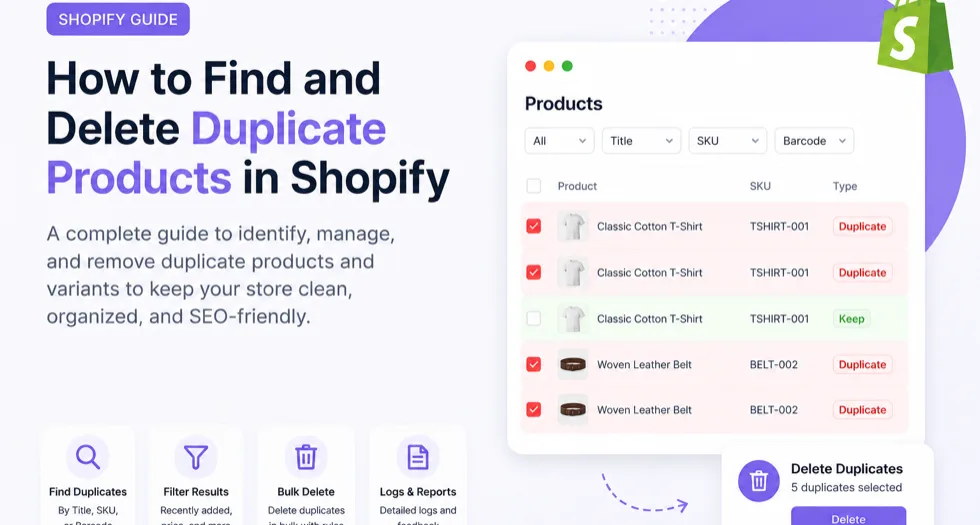
Duplicate products are one of the most common catalog issues Shopify merchants face. Whether you’ve imported products multiple times, migrated from another platform, or synchronized inventory using third-party apps, duplicate products and variants can quickly clutter your Shopify store.
Besides making inventory management harder, duplicate products can confuse customers, create SEO issues, and lead to incorrect stock management.
In this guide, you’ll learn:
- Why duplicate products appear in Shopify.
- How to identify duplicate products and variants.
- How to safely remove duplicates manually or in bulk.
- The fastest way to clean up large Shopify catalogs.
Why Do Duplicate Products Appear in Shopify?
Duplicate products usually aren’t created by Shopify itself. They’re typically introduced during product management workflows.
1. CSV Imports Performed More Than Once
One of the biggest causes is importing the same product CSV multiple times. If products are imported without matching existing handles or IDs, Shopify creates new product records instead of updating existing ones.
2. Store Migration
Moving products from WooCommerce, Magento, Etsy, Amazon, or another Shopify store can accidentally create duplicates when migration tools are run multiple times.
3. Inventory Sync Apps
Some inventory or ERP integrations may create duplicate products if synchronization settings aren’t configured correctly or if products exist in multiple systems.
4. Manual Product Creation
It’s surprisingly easy to manually create a product that already exists, especially in stores with hundreds or thousands of SKUs.
5. Duplicate Variants
Even when products aren’t duplicated, variants may accidentally share the same SKU or barcode, creating inventory conflicts.
Why Duplicate Products Are a Problem
Ignoring duplicate products can create several issues across your Shopify store.
- Customers may see identical products multiple times.
- Duplicate SKUs make inventory tracking unreliable.
- Duplicate barcodes can create fulfillment mistakes.
- Collections become cluttered with repeated products.
- Google may index duplicate product pages, weakening SEO signals.
The larger your catalog grows, the harder duplicate cleanup becomes.
How to Find Duplicate Products in Shopify
Shopify Admin doesn’t include a dedicated duplicate finder. Merchants usually have two options.
Option 1: Find Duplicates Manually
You can export your product catalog into CSV and sort products by title, SKU, or barcode in Excel or Google Sheets.
This works for small catalogs but becomes very time-consuming when managing thousands of products or variants.
Option 2: Use a Duplicate Product Finder
A duplicate finder scans your Shopify catalog automatically and groups products that share identical titles, SKUs, or barcodes.
This approach is significantly faster and reduces the chance of deleting the wrong products.
How to Delete Duplicate Products Manually
If you only have a handful of duplicates, Shopify’s built-in product management tools are enough.
- Open Products in Shopify Admin.
- Search for the duplicated product title or SKU.
- Open the duplicate product.
- Verify which product should remain.
- Delete the unwanted duplicate.
This method is fine for a few products, but repeating it hundreds of times isn’t practical.
How to Bulk Delete Duplicate Products in Shopify
When your store contains dozens or hundreds of duplicates, bulk deletion is the safer and faster option.
The recommended workflow is:
- Scan your catalog for duplicates.
- Group duplicates by SKU, barcode, or title.
- Review the results.
- Keep the correct product.
- Bulk delete the remaining duplicates.
This reduces manual work dramatically while giving merchants control over which products remain.
A Faster Solution: CS – Delete Duplicate Products
If your Shopify store has a growing catalog, manually identifying duplicate products isn’t efficient.
CS – Delete Duplicate Products is a Shopify app built specifically for detecting and removing duplicate products and duplicate variants from Shopify catalogs.
What the App Can Find
- Duplicate products by Title.
- Duplicate products by SKU.
- Duplicate products by Barcode (EAN/UPC).
- Duplicate variants with matching SKU or Barcode.
Bulk Delete with Rules
Instead of deleting products individually, merchants can choose rules such as:
- Keep the oldest product.
- Keep the newest product.
- Delete all remaining duplicates automatically.
This is especially useful after CSV imports or catalog migrations.
Review Before Deleting
Not every duplicate should be removed automatically.
The app allows merchants to review duplicate groups and manually delete individual products or variants before running a bulk cleanup.
Filter Duplicate Results
Large stores can narrow duplicate scans using filters like:
- Recently added products.
- Price.
- Product vs Variant duplicates.
Deletion Logs and Progress Tracking
Every bulk deletion job includes detailed logs and progress tracking so merchants know exactly what has been removed.
Who Should Use a Duplicate Finder?
This type of tool is particularly useful if you:
- Import products regularly.
- Manage thousands of SKUs.
- Use multiple inventory integrations.
- Migrated from another ecommerce platform.
- Need to clean an existing Shopify catalog.
Instead of exporting spreadsheets and comparing rows manually, duplicate scans can identify problematic products within minutes.
How to Install CS – Delete Duplicate Products
You can install the app directly from the Shopify App Store.
Install CS – Delete Duplicate Products on Shopify
The app includes a free plan for smaller cleanups and premium options for unlimited duplicate removal, priority processing, and CSV export.
Final Thoughts
Duplicate products are a common Shopify catalog problem, but they don’t have to become a long-term maintenance issue.
Whether duplicates were created by imports, migrations, or inventory syncs, cleaning them up improves inventory accuracy, store organization, customer experience, and SEO.
For a few duplicate products, Shopify’s admin tools may be enough. For larger stores, using a dedicated duplicate finder and bulk remover is a much faster and safer workflow.
At Sezerium, we recommend tools that solve real operational problems for Shopify merchants. CS – Delete Duplicate Products is one of our trusted partner apps for keeping Shopify catalogs clean and duplicate-free.