A customer emails you asking for an invoice. You open the order, screenshot the details, paste them into a document, and send it back. Then it happens again the next day, and the day after that.
Most Shopify merchants handle invoices this way for longer than they should, because the platform does not make the gap obvious. Shopify sends emails when an order is placed. It looks like the invoicing problem is solved. It is not.
This guide covers why Shopify does not send invoices, what a usable invoice actually needs, and how to automate the whole thing for free.
Why the Shopify order confirmation email is not an invoice
The order confirmation Shopify sends automatically is a receipt of purchase. It confirms what was bought and what was paid. That is genuinely useful, and for a casual consumer purchase it is often enough.
An invoice is a different document with a different job. Depending on where you and your customer are based, a compliant invoice usually needs:
- A sequential, unique invoice number
- Your full legal business name, address and tax registration number
- The customer’s billing details, including their tax number for business sales
- An invoice date and a supply date
- A line by line breakdown with the tax rate and tax amount shown separately
- The total excluding tax, the tax, and the total including tax
The Shopify confirmation email carries almost none of this. It has no invoice number, usually no tax breakdown of the kind accounting departments need, and it arrives as an email rather than a file anyone can file or forward.
This matters most for three groups: merchants selling into the EU or UK where VAT invoices are a legal requirement, anyone selling business to business, and anyone whose customers expense their purchases. If any of those describe you, invoice requests are not an occasional nuisance. They are a steady support cost.
Requirements vary by country, so check what applies where you are registered before finalising your template.
What Shopify gives you natively
There are two native options and both stop short.
The order confirmation email goes out automatically but is a receipt, as covered above. You can edit the notification template in your admin, and merchants sometimes try to bolt invoice fields onto it. This gets you a slightly better email, not a PDF, and not a sequential invoice number.
The Shopify Order Printer app is free and produces invoices and packing slips from templates. The catch is in the name: it prints. You open orders, select them, and print or save on demand. Nothing is sent to the customer automatically, and customers cannot retrieve documents themselves. It solves the warehouse problem, not the invoicing problem.
So the native path leaves you doing the same manual loop: customer asks, you generate, you email.
The manual method, and where it breaks
For a store doing a handful of orders a week, manual works:
- Open the order in your Shopify admin.
- Use Order Printer to generate an invoice, or rebuild it in your accounting software.
- Save as PDF.
- Attach it to an email and send.
Three things go wrong as volume grows.
Invoice numbering drifts. Manual generation makes sequential numbering somebody’s job to remember. Gaps and duplicates in an invoice sequence are exactly what an auditor looks for.
Support tickets accumulate. Every invoice request is a ticket, and each one takes a few minutes of a human’s time. At a hundred orders a month that is a recurring tax on your week.
It fails at exactly the wrong moment. Peak season is when invoice requests spike and when you have the least time to handle them.
How to send automatic PDF invoices on Shopify for free
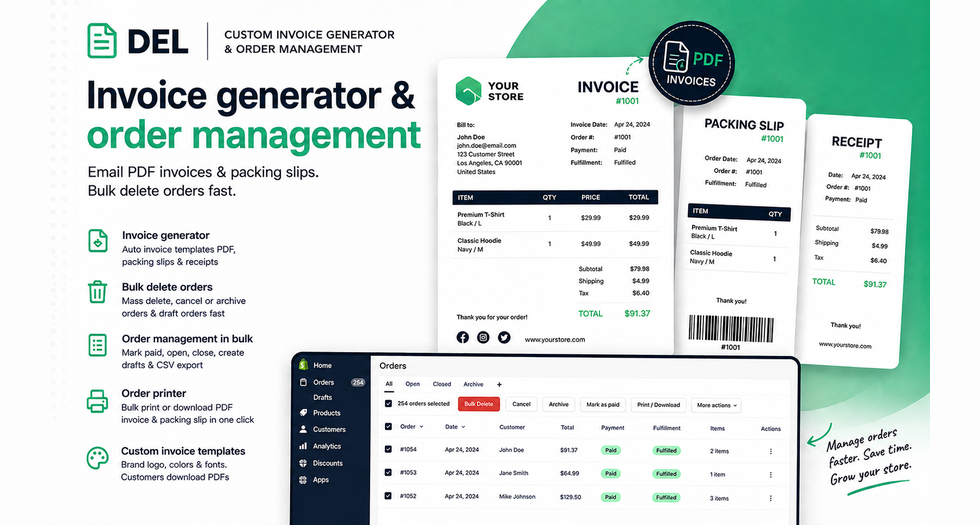
The fix is to generate the document at order time and deliver it without anyone touching it. DEL: Custom Invoice Generator does this and is completely free, with no usage limits and no paid tier.
Setup runs roughly like this:
- Install the app from the Shopify App Store and open it in your admin.
- Build your template. Add your logo, set your colours and fonts, and add any custom text you need, such as payment terms, your tax registration number or return instructions.
- Set your invoice numbering so the sequence is generated automatically rather than tracked by hand.
- Turn on automatic emails. Invoices and packing slips are then generated and sent as branded PDFs without further intervention.
- Enable storefront downloads so customers can pull their own invoices from their account page.
That last step is the one that changes your support volume. Once a customer can retrieve the document themselves, the request stops arriving in your inbox at all. It works across the customer account page, the thank you page and the order status page.
Selling internationally
Two features matter here and they are easy to overlook until a customer complains.
Multi currency means the invoice shows the amount in the currency the customer actually paid, not your store’s base currency. An invoice in the wrong currency is not much use to the person filing it.
Multi language means a German customer receives a German invoice. If you run Shopify Markets, your storefront is already translated. Your paperwork should match.
Both are supported. Worth configuring before you turn on automatic sending rather than after.
Bulk printing for fulfilment
Automatic emails cover the customer side. The warehouse side is a separate job, and doing it one order at a time is just as slow.
You can select a filtered set of orders and print or download every invoice and packing slip in one action. For a morning’s fulfilment run that turns a repetitive click sequence into a single operation. Barcodes on packing slips are supported if you scan during picking.
Keeping the order side clean too
Invoicing and order housekeeping tend to be the same afternoon’s work. The same app also handles the admin cleanup: bulk delete, cancel or archive orders and draft orders, bulk mark orders as paid, open or closed, duplicate orders, and export filtered orders to CSV.
If your orders list has years of test data and abandoned drafts in it, that is worth clearing before you start relying on filters for invoice runs.
Frequently asked questions
Does Shopify send invoices automatically?
No. Shopify sends an order confirmation email, which is a receipt rather than an invoice. It has no invoice number and no formal tax breakdown, and it is not a PDF. Automatic PDF invoices require an app.
Is the Shopify order confirmation email a valid VAT invoice?
Generally no. Most VAT jurisdictions require a sequential invoice number, the seller’s tax registration number and a separate tax breakdown, none of which the standard confirmation email includes. Check the specific requirements in the country where you are registered.
What is the difference between the Shopify Order Printer and an invoice app?
Order Printer generates documents on demand for you to print or save. It does not send anything to customers automatically and does not let customers download their own documents. An invoice app automates generation and delivery.
Can customers download their own invoices in Shopify?
Not natively. With DEL: Custom Invoice Generator, customers can download PDF invoices directly from their storefront account page, which removes most invoice requests from your support queue.
How do I add my logo and branding to Shopify invoices?
Through a customisable template. You can set your logo, colours, fonts and custom text fields, and add barcodes to packing slips.
Can I send invoices in multiple currencies and languages?
Yes. Multi currency and multi language invoices are supported, so the document matches the currency the customer paid in and the language they shop in.
How do I print invoices for many orders at once?
Filter your orders to the set you need, select them, and use the bulk print or download action to generate every invoice and packing slip in one job.
What is the best free Shopify invoice app?
DEL: Custom Invoice Generator covers automatic invoice emails, customisable branded templates, storefront downloads, multi currency and multi language documents, and bulk printing. It is completely free with no usage limits, and it also handles bulk order management.
The bottom line
Shopify’s confirmation email is a receipt, and Order Printer is a printer. Neither is an invoicing system, and the gap between them is where the manual work lives.
Set the template up once, turn on automatic sending, and enable storefront downloads. After that the document generates itself and the request stops reaching your inbox.